
If you want your WordPress website to be more visible in search engines and bring more traffic, SEO optimisation is a mandatory part of everyday site management. Yoast SEO is one of the most popular and powerful WordPress SEO plugins, and it makes optimising a website simple and effective.
Yoast SEO comes in a free and a paid version, and both offer excellent tools for optimising your website. The free version suits beginners well, offering the basic tools to improve your site’s SEO and readability. The paid version adds a set of powerful extra features that help you optimise and analyse the site in even more detail.
Tasuta versiooniga saad:
- SEO and readability analysis: gives feedback on how to use your focus keyword and how to make the content easier to read.
- Meta pealkirjade ja kirjelduste optimeerimine: aitab Sul luua otsingumootoritele sobivaid pealkirju ja kirjeldusi.
- XML saidikaardid: aitavad otsingumootoritel Sinu kodulehte paremini indekseerida.
- Focus keyword: you can optimise each page or post for one keyword.
The paid version additionally offers:
- Multiple focus keywords: lets you optimise posts and pages for up to five keywords at once.
- Sisemiste linkide soovitused: annab automaatselt soovitusi, milliseid lehti oma kodulehelt linkida, et parandada SEO-d.
- Content review and optimisation tools: give more detailed suggestions for improving content and growing traffic.
- Social media previews: set custom titles, images and descriptions to see how your content appears on social media platforms.
- Support and updates: access to priority support and regular updates.
If you are just starting out, the free version of Yoast SEO is an excellent choice, but if you want deeper and more detailed optimisation, it is worth considering the paid version. Yoast SEO paigaldada ja seda kasutama hakata, et Sinu koduleht vastaks parimatele SEO standarditele ning paistaks silma otsingutulemustes:
1. Log in to your WordPress admin panel.
Log in to your WordPress site with administrator rights, so you can manage plugins and the site content.
2. Add the Yoast SEO plugin.
In the WordPress dashboard menu find “Plugins”, choose “Add New” and search for “Yoast SEO”.Yoast SEO“. 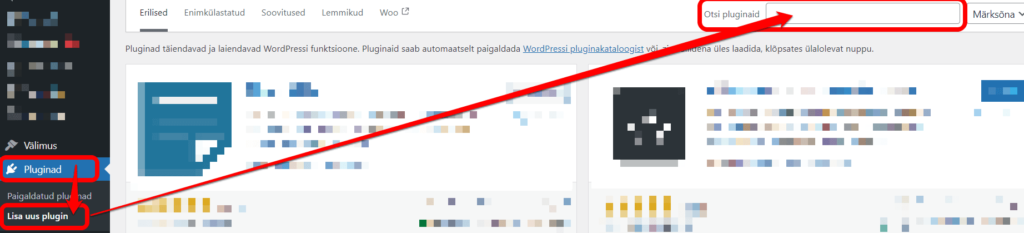
Install and activate the plugin: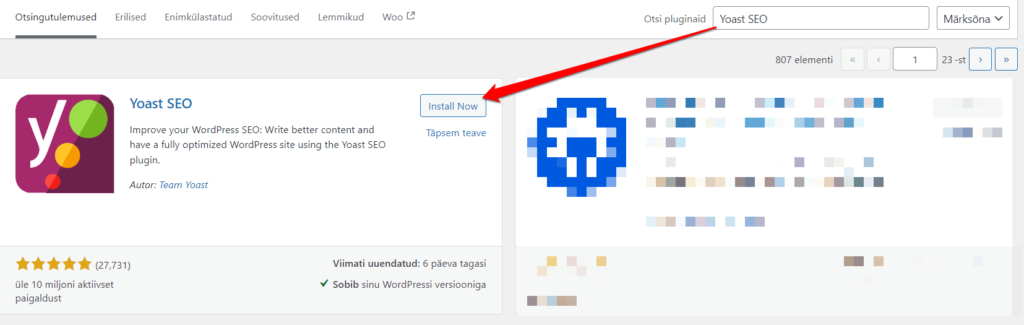
Then activate the plugin: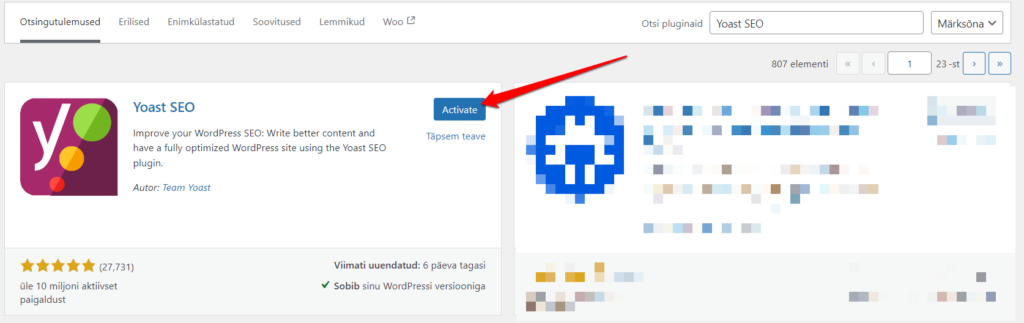
3. Optimise your pages and posts.
Now, on every page or post, you can add a focus keyword and a meta description through Yoast, and use the SEO analysis and readability tools that give instant suggestions.
4. Add metadata and social media settings.
Make sure your page is also optimised for social sharing: Yoast lets you add custom titles and images that are shown on Facebook and X (Twitter).
Optimising a website’s SEO can feel complicated, but the Yoast SEO plugin makes the process much simpler and more effective. By following Yoast’s guidance and these simple steps, you can improve your site’s visibility in the search results, grow your traffic and reach better results. If you are ready to take your SEO to the next level, start setting up Yoast today and watch your website climb in the search engines!
Kui see artikkel oli Sulle kasulik, siis kliki “Meeldib” ja kui võiks ka sinu sõpradele huvitav olla, siis kliki “Jaga.”