
If your company has a bank account at LHV, you can switch on an automatic account statement request in Merit Aktiva. There is no more need to import the statement from a file: the import is now done automatically, straight from the bank. It is a great way to automate one of the monthly routines, so that neither you nor your accountant spends time on something that can happen without wasting anyone’s time. Merit Aktivas
If all kinds of automation feel like a headache or a time sink to you, the guide below is exactly for you! Connecting the bank to the accounting program is actually quick and simple. Invest 10 minutes to save 10 minutes every day from now on (about 300 minutes, roughly 5 hours, a month!).
How do you create the direct feed from Merit Aktiva to LHV?
Follow this guide step by step and everything will be ready in a few minutes!
What needs to be done in the accounting program?
Switch on the direct connection with LHV on the bank account card, from the menu Payments > Banks. Maksed > Pangad.
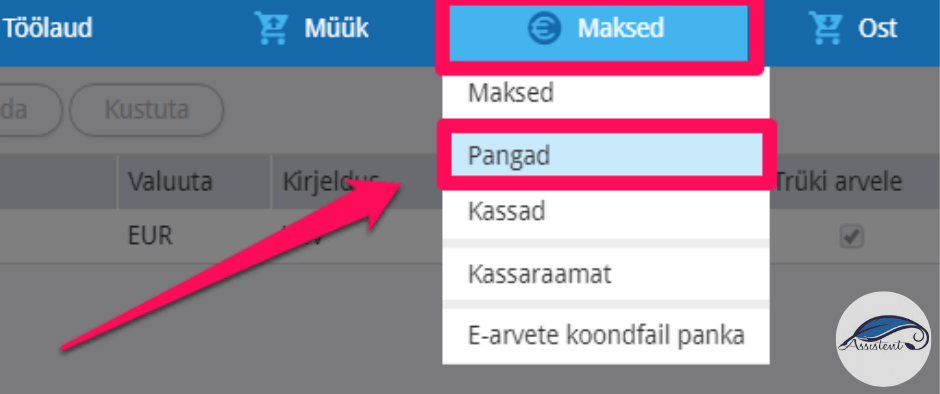
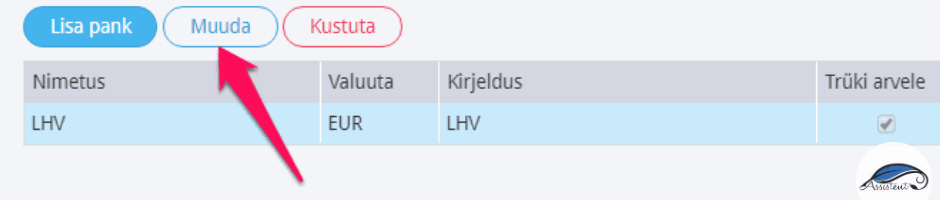
If the bank account is already added, edit it:
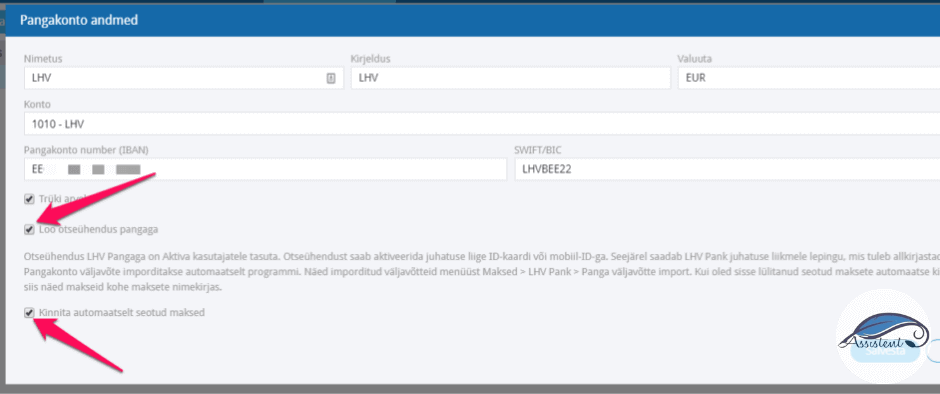
If the LHV IBAN account number has been entered on the bank card, you will see the buttons “Create a direct connection with the bank” and “Confirm automatically matched payments”.
When you click “Create a direct connection with the bank”, an identification window opens where the company’s authorised signatory can identify themselves with an ID-card or mobile-ID. A corresponding notice is then sent to LHV automatically.
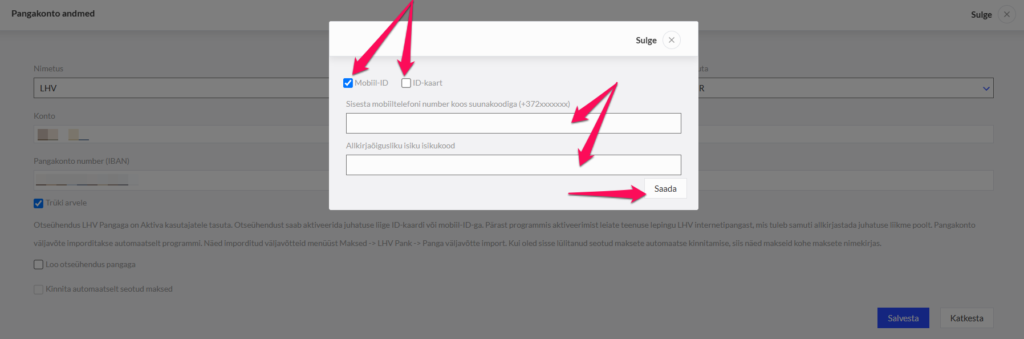
NB! Once you have connected one bank account, you do not have to identify yourself again when adding the next ones.
What does the company’s representative have to do next?
The bank sends the Connect service agreement to the authorised signatory’s email; it must be digitally signed and returned to the bank. LHV then opens the direct connection with Aktiva.
On working days the program requests the account statement every half hour, and outside working hours every one or two hours. The data is imported into the LHV payments window “Bank statement import” in Aktiva. If automatic confirmation of matched payments is also switched on, incoming payments land in the payments list automatically: invoices are marked as paid and no longer show up as debts.
If you also have an account at Swedbankyou can connect it too. On our site you will also find juhendi!
If you also have an account at SEB you can connect it too. On our site you will also find juhendi!
If this guide was useful to you, click “Like”, and if it could interest your friends as well, click “Share”.